Managing your maps
If you own a chainmap, you can change its settings and who has access to it. You'll see Manage Map in the siggy scan menu in the top left corner when you own at least one map.
My Maps
My Maps lists the chainmaps you own in your group. Press Manage to change one.

Map settings
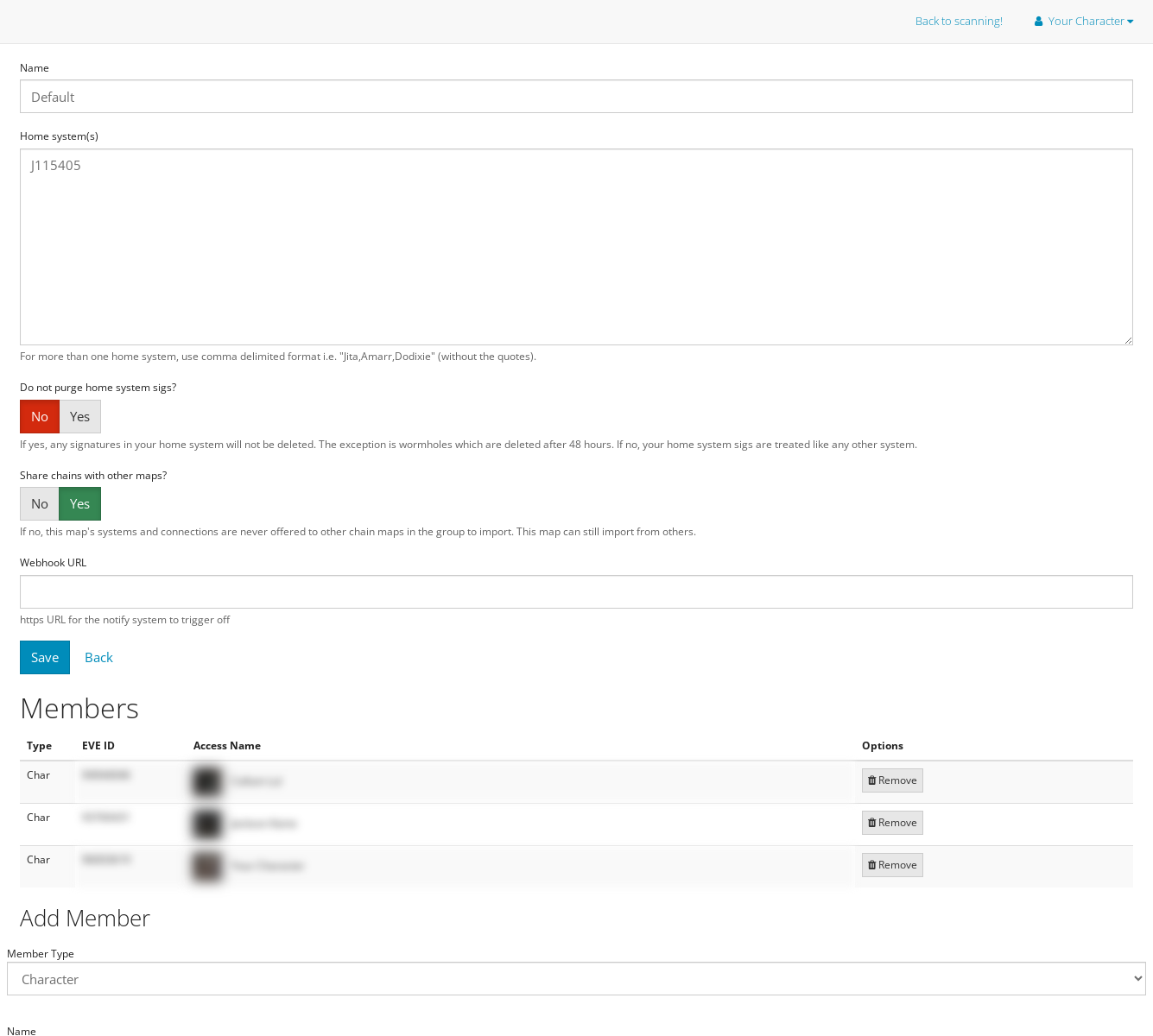
- Name: The name of the chainmap, shown in the chainmap drop down on the map.
- Home system(s): The system or systems the chain is built from. For more than one, separate them with commas e.g.
Jita,Amarr,Dodixie. - Do not purge home system sigs?: If yes, signatures in your home system won't be deleted, except wormholes which are deleted after 48 hours. If no, your home system sigs are treated like any other system.
- Share chains with other maps?: If no, this map's systems and connections are never offered to other chainmaps in the group to import. This map can still import from others.
- Webhook URL: An https link for notifications on this map to be sent to.
Press Save to keep your changes.
Members
The Members table shows who can see the map, either a whole corporation or a single character. Press Remove to take someone off.
To add someone:
- Under
Add Member, pickCorporCharacteras the member type - Type their exact in-game name and search
- Press add next to the right result